

Looking for the best laptop deals for college students in 2026? The right laptop should balance performance, battery life, portability, and price. Whether you need a laptop for coding, online classes, assignments, content creation, or gaming, choosing the right specifications can help you get better long-term value.
In this guide, we have shortlisted student-friendly best laptops across different budgets and use cases. You will find affordable options for everyday study, stronger laptops for coding and engineering, and powerful models for gaming and demanding workloads. Before buying, compare the latest price, specifications, warranty, and available offers to find the best deal for your budget.
✅ Quick tip: Always check for bank card offers and student discount coupons before buying — you can save ₹2,000–₹8,000 extra on top of the listed price.
Best Laptop Deals for College Students at a Glance
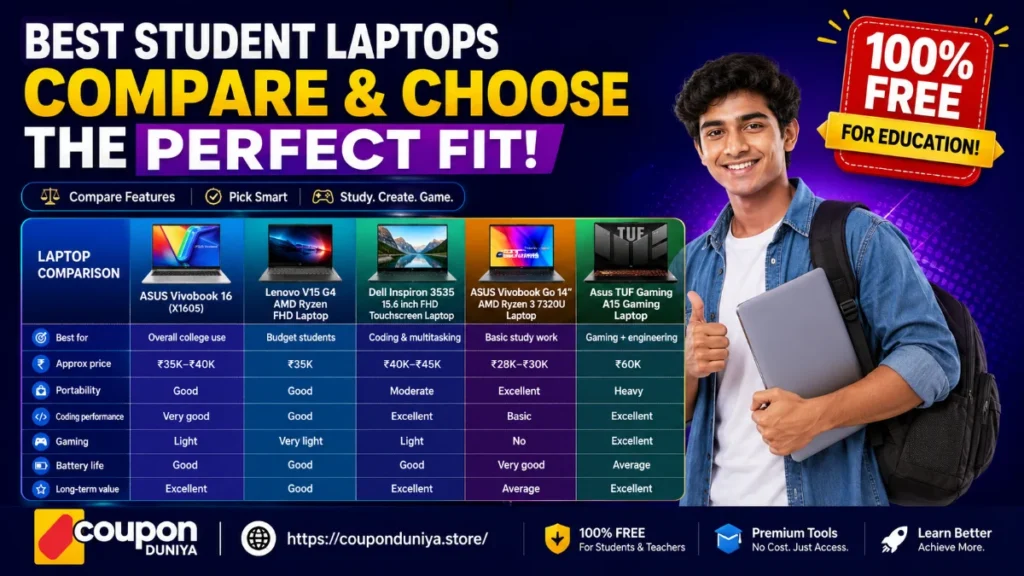
If you want a quick recommendation, start with this comparison table. These are the best laptop deals for college students in 2026 based on budget, coding performance, portability, and long-term value.
| Laptop | Best For | Performance | Portability | Long-Term Value |
|---|---|---|---|---|
| ASUS Vivobook 16 (X1605) | Overall college use | Excellent | Good | Excellent |
| Lenovo V15 G4 | Everyday study and assignments | Good | Good | Good |
| Dell Inspiron 3535 | Coding and multitasking | Excellent | Moderate | Excellent |
| ASUS Vivobook Go 14 | Portability and note-taking | Good | Excellent | Good |
| ASUS TUF Gaming A15 | Gaming, engineering, and creative work | Excellent | Moderate | Excellent |
Quick Picks
- Best Laptop Overall: ASUS Vivobook 16 (X1605)
- Best Laptop for Coding & Engineering Students: Dell Inspiron 3535
- Best Laptop for Everyday Study: Lenovo V15 G4
- Best Laptop for Portability: ASUS Vivobook Go 14
- Best Laptop for Gaming & Creative Work: ASUS TUF Gaming A15
Best Laptop for Overall College Performance
If you want one laptop that can handle coding, online classes, assignments, content creation, research, and everyday multitasking, the ASUS Vivobook 16 (16-inch Ryzen Series) is one of the strongest overall choices for college students. Its large Full HD display, SSD storage, and capable Ryzen processor make it suitable for both academic work and long study sessions.
Students who prioritize everyday reliability and practical performance can choose the Lenovo V15 G4, which offers a dependable AMD Ryzen processor, good battery life, and smooth performance for browsing, MS Office, Zoom, and light programming tasks.
For most Indian students, these two laptops provide an excellent balance of performance, portability, warranty support, and long-term value. Whether you are studying engineering, commerce, arts, or computer science, they are well-suited for the workloads that college students typically encounter throughout a degree program.
This version is evergreen, avoids price references, and naturally reinforces Best Laptop and Best Laptop Deals without requiring future updates whenever Amazon pricing changes.
Best Laptop overall
The ASUS Vivobook 16 (X1605) is one of the best overall laptops for college students because it delivers a strong balance of performance, display quality, battery life, and long-term usability. Whether you are studying engineering, computer science, commerce, or arts, it is capable of handling demanding academic workloads without feeling slow after a few semesters.
It performs particularly well for:
- Coding and programming
- Assignments and project work
- Online classes and video conferencing
- Content writing and research
- Light photo and video editing
- Everyday multitasking
The Ryzen-powered variants offer smooth performance for multiple browser tabs, productivity apps, and development tools running simultaneously. The 16-inch Full HD display is especially useful for coding, spreadsheet work, reading PDFs, and comparing documents side by side.
The Vivobook 16 is particularly popular among B.Tech, BCA, and computer science students because the larger display reduces eye strain during long coding sessions. ASUS also provides on-site warranty support across India, making it a practical choice for students who may not have easy access to service centres in every city.ear on-site warranty across India, which matters if you’re in a tier-2 city without easy service access.
Best Laptop for Everyday Study and Assignments
The Lenovo V15 G4 is one of the most practical laptops for students who need a reliable machine for everyday college work, online learning, office applications, browsing, and light programming. It offers a balanced combination of performance, battery life, and durability, making it a strong choice for students who want a laptop that can handle daily academic tasks without unnecessary complexity.
It is especially suitable for:
- B.A., B.Com., and B.Sc. students
- Online classes and video lectures
- MS Office and productivity work
- Web browsing and research
- Light coding and programming
Lenovo Ryzen laptops are popular among students because they provide consistent performance, good battery efficiency, and dependable build quality. The Lenovo V15 G4 handles MS Office applications, multiple browser tabs, video conferencing, and basic development tools smoothly, making it a dependable companion throughout a college degree program. Lenovo’s extensive service network across India is another advantage for students who may need warranty or repair support during their studies.ls simultaneously without thermal throttling — a common complaint with budget Intel Celeron alternatives in this price range.
Best Laptop for Coding & Engineering Students
The Dell Inspiron 3535 is one of the best laptops for students who need a reliable machine for coding, programming, engineering coursework, multitasking, and long-term academic use. It offers strong everyday performance, a responsive SSD, and a comfortable display, making it suitable for both classroom work and project-based learning.
It is especially recommended for:
- Computer science and engineering students
- Programming and software development
- Multitasking with multiple applications and browser tabs
- Online classes and technical coursework
- Long-term productivity and future usability
The Ryzen-powered configuration delivers smooth performance for development tools such as VS Code, IntelliJ, Python IDEs, and browser-based coding platforms. It can comfortably handle coding assignments, documentation, spreadsheets, video conferencing, and other everyday college tasks without the slowdowns often seen in entry-level laptops.
For engineering students, the Full HD display is particularly useful for circuit diagram applications, CAD viewers, simulation tools, and annotation-based learning. The combination of modern hardware and efficient storage makes the Dell Inspiron 3535 a dependable choice for students who expect their laptop to remain useful throughout a multi-year degree program.
Students who use Adobe Creative Cloud for design, photo editing, video editing, or multimedia projects should also check our Adobe Student Discount 2026 guide before purchasing Adobe software.
Best Laptop for Gaming & Creative Work
The ASUS TUF Gaming A15 is one of the best laptops for students who need desktop-level performance in a portable machine. It is particularly suitable for engineering students, content creators, and learners working with demanding software such as video editors, 3D modeling tools, programming environments, and AI or machine learning applications.
It is especially recommended for:
- Engineering and technical students
- AI and machine learning learners
- Video editing and content creation
- Graphic design and multimedia projects
- Gaming during free time
The TUF Gaming A15 offers significantly stronger processing and graphics performance than most standard student laptops, making it ideal for heavy multitasking, large software projects, and graphics-intensive applications. While gaming laptops are generally heavier than ultrabooks, they provide the extra power needed for creative work, simulations, programming, and modern games.
If you plan to use your laptop for gaming, online classes, and entertainment, our EarFun Coupon Codes page also includes deals on wireless earbuds and headphones that pair well with student laptops.
Best Laptop for Portability and Note-Taking
The ASUS Vivobook Go 14 is an excellent choice for students who value portability, battery life, and everyday convenience. Its lightweight design makes it easy to carry between classes, libraries, coaching centres, and hostels, making it a practical companion for students who are constantly on the move.
It is especially suitable for:
- Note-taking during lectures
- Online classes and video streaming
- Google Docs and cloud-based study tools
- Web browsing and research
- Students who travel frequently
The Vivobook Go 14 is designed for lightweight academic work and everyday productivity rather than heavy professional workloads. It performs well for browsing, document editing, presentations, video calls, and general college tasks, while remaining compact enough to fit comfortably in a backpack.
If your primary goal is coding, video editing, 3D work, or gaming, a more powerful laptop such as the Dell Inspiron 3535 or ASUS TUF Gaming A15 will be a better long-term investment. For students who prioritize mobility and ease of use, the ASUS Vivobook Go 14 remains one of the most practical portable laptop options available.
What to check before buying any student laptop in 2026
Based on feedback from students across India, here are the four things that matter most and are often overlooked:
Which Laptop Should You Choose?
| If you are… | Choose |
|---|---|
| A B.Tech or BCA student | ASUS Vivobook 16 |
| A coding/programming student | Dell Inspiron 3535 |
| A commerce or arts student | Lenovo V15 G4 |
| A student who travels daily | ASUS Vivobook Go 14 |
| A gamer or content creator | ASUS TUF Gaming A15 |
RAM upgradability: Many ₹30K–₹45K laptops ship with 8GB RAM soldered to the motherboard — meaning you cannot upgrade later. Always check the spec sheet for “expandable RAM” or a free RAM slot. The ASUS Vivobook 16 and Dell Inspiron 3535 both have upgradable RAM.
SSD type (NVMe vs SATA): NVMe SSDs boot Windows in under 10 seconds; SATA SSDs take 20–30 seconds. In the budget segment, some brands quietly ship SATA to cut costs. Check before buying.
Warranty coverage in your city: ASUS and Dell have service centres in most tier-2 cities. HP’s warranty coverage is strong in metro areas but patchy otherwise. Lenovo has the widest pan-India service network in the budget segment.
Battery rated vs real-world: Manufacturer battery claims are tested at minimum brightness. Real-world college use (screen at 60–70%, Wi-Fi on, light apps) typically gives 60–70% of the claimed hours. A laptop claiming 10 hours will realistically give you 6–7 hours.
Many Reddit users and student communities now recommend avoiding Celeron processors and choosing at least Ryzen 3/i3 with SSD storage for smooth long-term usage.
How to save extra money when buying your college laptop
Buying the laptop is step one — but smart students save ₹2,000 to ₹8,000 more by stacking discounts:
Student bank offers: SBI, HDFC, and ICICI regularly run 10% instant discount on electronics during Flipkart Big Billion Days and Amazon Great Indian Festival. If your purchase can wait 2–3 weeks, the savings are significant.
No-cost EMI + cashback: Most ₹35K–₹60K laptops qualify for 6–12 month no-cost EMI. Pair this with a cashback credit card (Axis Flipkart, HDFC Millennia) and you effectively reduce the price by 1.5–2%.
Coupon codes: Before checkout, check our latest Amazon India Coupon Codes page for verified electronics deals, bank offers, and student-friendly laptop discounts.
Refurbished certified units: Amazon Renewed and Flipkart 2GUD offer grade-A refurbished laptops at 20%–30% lower prices with 6-month warranties. Worth considering if your budget is tight.
Frequently Asked Questions
Which laptop is best for a B.Tech student under ₹40,000 in 2026?
The ASUS Vivobook 16 (X1605) is our top recommendation for most B.Tech students. It offers a 16-inch FHD display, Ryzen 5 processor, 16GB RAM, and 512GB SSD — all under ₹36,000.
Is 8GB RAM enough for college in 2026?
For basic tasks like MS Office, browsing, and video calls — yes. But for coding (especially Android Studio, IntelliJ, or running local servers), 8GB feels tight by year 2. We recommend a minimum of 16GB RAM, or at least a laptop with an expandable RAM slot so you can upgrade later for ₹1,500–₹2,500.
Should I buy a laptop with a dedicated GPU for college?
Only if you’re in game development, video editing, or AI/ML coursework. For most engineering, commerce, and arts students, an integrated AMD Radeon GPU (found in Ryzen laptops) handles all college tasks and most casual gaming. A dedicated GPU adds ₹15,000–₹20,000 to the price and reduces battery life by 30–40%.
Which is better for students — AMD Ryzen or Intel Core?
In the ₹30,000–₹50,000 segment, AMD Ryzen consistently outperforms Intel in multi-core tasks and battery efficiency. Intel’s advantage comes at the ₹70,000+ range (Core Ultra chips). For Indian college budgets, Ryzen 5 or Ryzen 7 is the smarter choice in 2026.
Can I get a student discount on laptops in India?
Yes — though it’s not as structured as in the US. The best ways are: (1) Amazon and Flipkart student programs occasionally offer 5–10% extra off, (2) some colleges have tie-ups with HP and Dell for bulk pricing, (3) using coupon codes during sale events like Big Billion Days or Great Indian Festival. Check our Students Discount category for currently active codes.
Is it better to buy a laptop online or from a store in India?
Online (Amazon, Flipkart) almost always offers better prices — typically ₹2,000–₹5,000 cheaper than retail. Physical stores are useful for physically testing the keyboard and build quality before deciding. A common strategy: go to Croma or Reliance Digital to feel the laptop, then buy online with a coupon code.
Which laptop gives the best value for money in 2026?
For most Indian college students, the ASUS Vivobook 16 (X1605) offers the best value because it combines a Ryzen processor, SSD storage, a large display, and strong long-term usability while remaining under ₹40,000.